
Seedance 2.5 Flash: Up to 30-Second AI Videos With Audio, Now Online
Seedance 2.5 Flash is ByteDance's fast Seedance 2.5 video model: text-to-video, first and last frame control and up to 10 reference images, with clips up to 30 seconds and built-in audio. Features, pricing, prompt tips and how to try it.
Seedance 2.5 is one of the most searched AI video models right now. Seedance 2.5 Flash is the fast, lower-cost version of it. It keeps the parts most people need: long clips, sound, start and end frame control and reference images.
Seedance 2.5 Flash is now live on Grok Imagine. Here is what it does, how it compares to the Seedance 2.0 models already on the site, and how to get good results.
What Seedance 2.5 Flash Does
| Seedance 2.5 Flash | |
|---|---|
| Input | Text, first frame, first + last frame, or up to 10 reference images |
| Length | 4 to 30 seconds (any whole second) |
| Resolution | 480p or 720p |
| Aspect ratio | 16:9, 9:16, 1:1, 4:3, 3:4, 21:9 or adaptive |
| Audio | On by default, same price with or without |
| Price on Grok Imagine | 5s: 28 credits (480p), 63 credits (720p) |
The headline feature is length. Most models stop at 10 or 15 seconds. Seedance 2.5 Flash goes up to 30 seconds in one generation, so a full product demo, a short scene or a looping background can come out as one clip.
Three Ways to Use It
1. Text to video
Write a prompt and pick a length. This is the fastest way to explore ideas.
2. First frame, or first and last frame
Upload one image and Seedance 2.5 Flash animates it. Upload two images and it creates a transition from the first to the last. Frame mode uses the aspect ratio of your image, so you do not have to set one.
3. Reference images
Switch Image Use to Reference Images and upload up to 10 pictures: a character, a product, an outfit, a location. Then refer to them in your prompt as @image1, @image2 and so on:
@image1 walks through the market in @image2, picks up an apple and smiles at the camera
This keeps a character or product consistent without needing it to be the first frame.
Seedance 2.5 Flash vs. Seedance 2.0
| Seedance 2.5 Flash | Seedance 2.0 Fast | Seedance 2.0 Mini | |
|---|---|---|---|
| Max length | 30s | 15s | 15s |
| Resolutions | 480p, 720p | 480p, 720p | 480p, 720p |
| Reference images | Up to 10 | Up to 9 | Up to 9 |
| Audio | On by default | Optional | Optional |
| 5s / 720p | 63 credits | 52 credits | 18 credits |
Pick Seedance 2.5 Flash when you need clips longer than 15 seconds or the newer model. For quick, cheap tests, Seedance 2.0 Mini is still the budget pick.
What We Saw in Our Test
We ran two tests on Grok Imagine.
Text to video, 5 seconds, 720p, audio on:
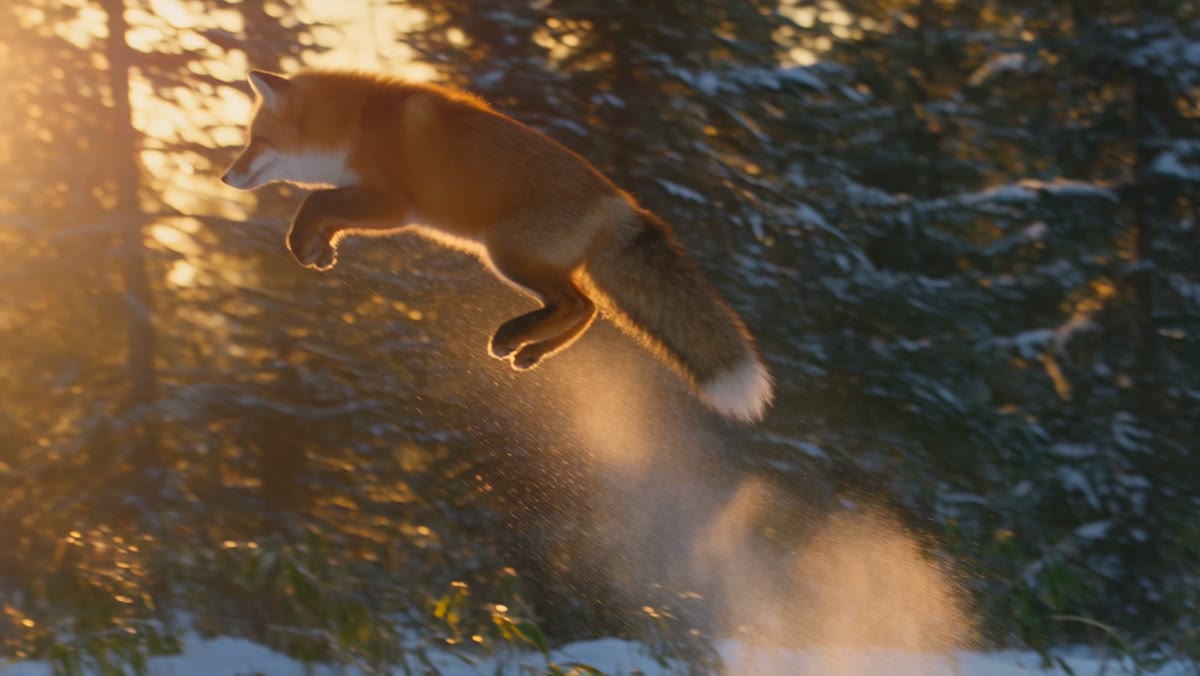
A red fox leaps through fresh snow in a pine forest at sunrise, slow motion powder spray, golden backlight, wildlife documentary
The clip was ready in about two minutes. The fox's jump, the snow spray and the backlight all matched the prompt, and the clip came with stereo audio.
First frame, 5 seconds, 480p: we animated an illustration of children floating in a space station. It took under a minute and a half. The art style and the characters stayed the same as the source image, and the output kept the image's own shape instead of cropping it to 16:9.
Prompt Tips for Seedance 2.5 Flash
- Give long clips a sequence. For 15 to 30 seconds, describe what happens in order: "First…, then…, finally…". Without it, long clips can drift.
- Keep image-to-video prompts about motion. The image already shows the scene. Describe the movement and camera: "slow push-in, hair moving in the wind, she turns and smiles".
- Use 480p to test, 720p to finish. 480p costs less than half as much. Lock the prompt at 480p, then re-run at 720p.
- Name the sound. Audio is on by default. Add "footsteps on gravel, birdsong" or "upbeat electronic music" to steer it, or turn audio off in settings for a silent clip at the same price.
- Choose adaptive for odd image shapes. If your reference image is not a standard ratio, adaptive avoids cropping.
For general prompt structure, read The Complete Prompt Guide.
How to Use Seedance 2.5 Flash on Grok Imagine
- Open the AI video generator. Seedance 2.5 Flash is preselected from this link.
- Choose text-to-video or image-to-video. For images, pick First / Last Frame or Reference Images.
- Set the length (4–30s), resolution and aspect ratio.
- Click Generate.
Seedance 2.5 Flash is available on any paid plan or credit pack. See pricing.
FAQ
How long can Seedance 2.5 Flash videos be? From 4 to 30 seconds, in one-second steps.
Does Seedance 2.5 Flash support 1080p? No. It generates 480p or 720p.
Is Seedance 2.5 Flash free? It uses credits, from 28 credits for a 5-second 480p clip. It is available with any paid plan or credit pack.
Can I keep the same character across clips?
Yes. Use Reference Images with up to 10 pictures of the character and mention them as @image1, @image2 in your prompt.
Author

Categories
More Posts

Veo 3.1 Lite: The Cheapest Way to Make Veo 3.1 Videos With Audio
Veo 3.1 Lite is Google's lightweight Veo 3.1 model: 8-second text-to-video clips with native audio in 720p, 1080p or 4K. See what it can do, how it compares to Veo 3.1 Fast and Quality, what it costs, and how to try it online.

The Complete Prompt Guide for AI Image and Video Generation
Learn how to write effective prompts for AI image and video generation. Covers prompt structure, best practices, common mistakes, and ready-to-use examples for text-to-image, image-to-image, text-to-video, and image-to-video workflows.
Kling 4.0: 30-Second AI Videos With Stereo Sound and 10 Reference Images
Kling 4.0 generates 3 to 30-second videos in 720p or 1080p with stereo audio built in. It supports text-to-video, first and last frame control and up to 10 reference images. Features, pricing, prompt tips and how to use Kling 4.0 online.